The first Babbls are on the table

Independent for longer.
With Babbl close by.

Babbl is a small, round device that sits on your table. You talk to it as you would to someone you trust — no screen, no hunting for buttons. And Babbl helps with everyday things: understanding a letter, remembering an appointment, sorting something out.

Just talk Stay in control Help close by when you need it
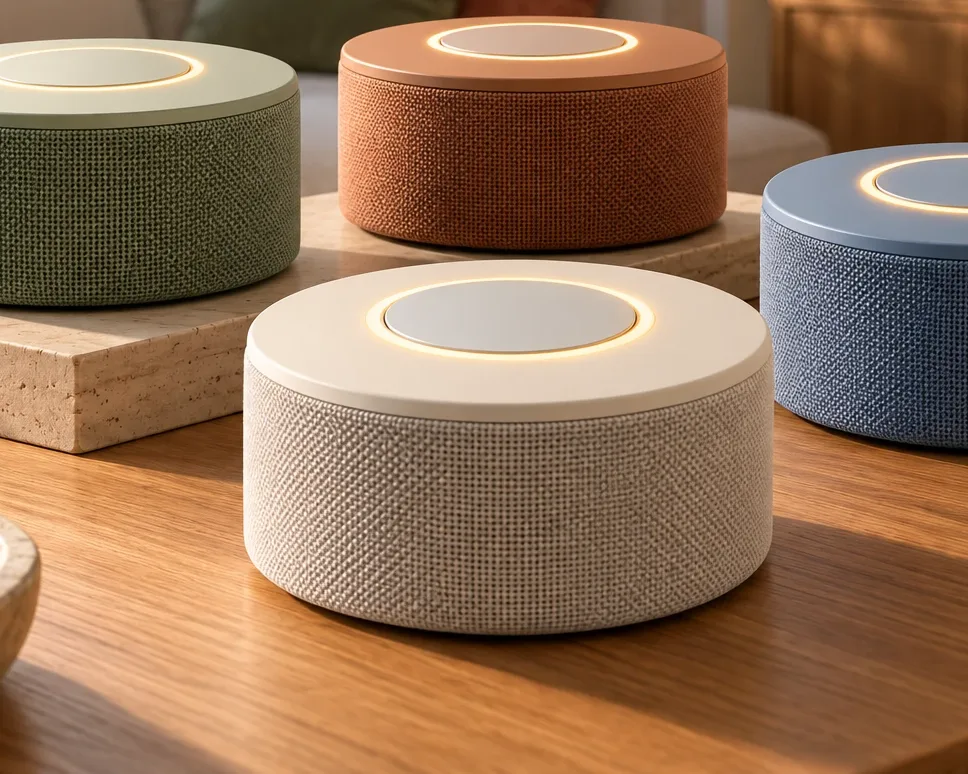
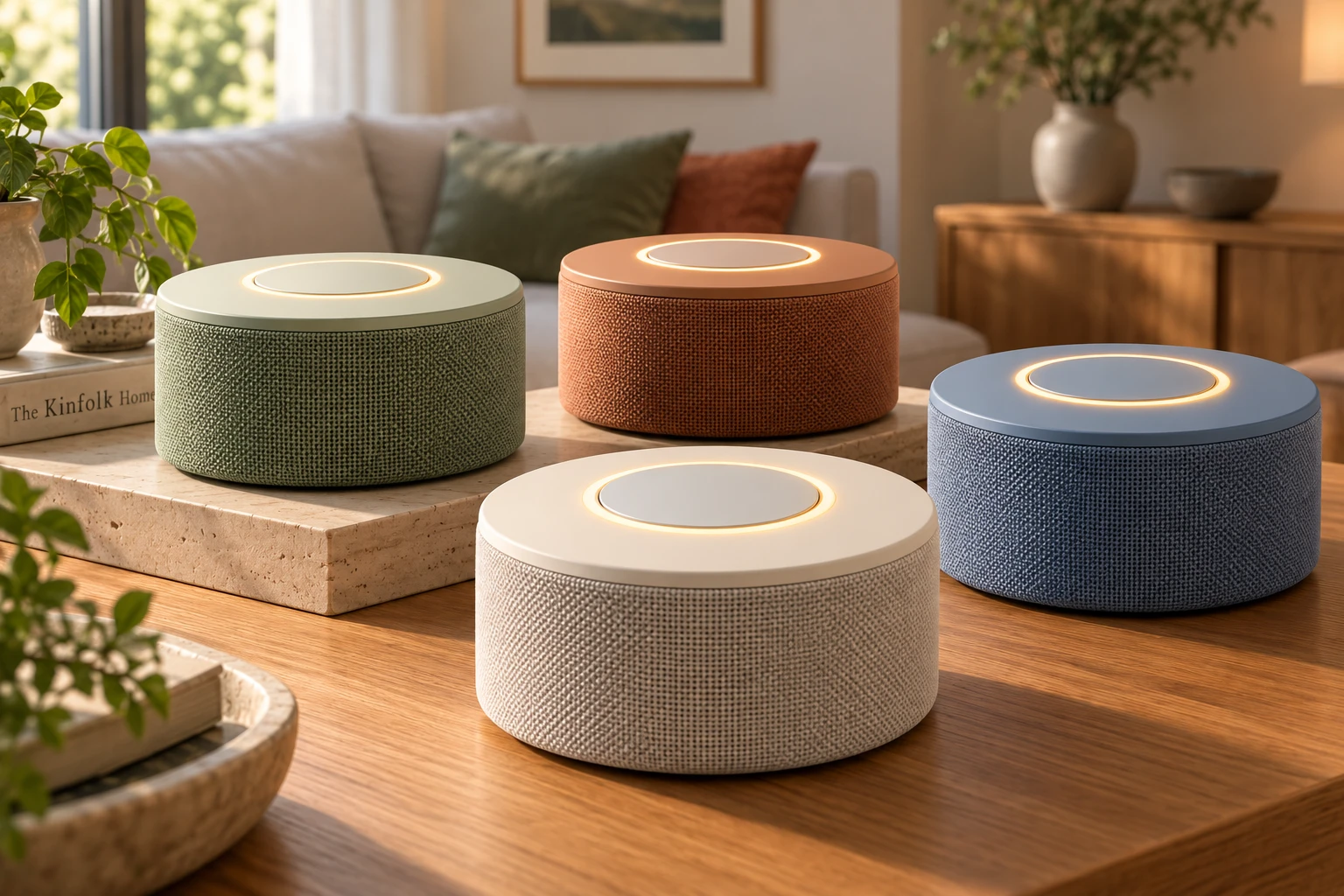
Babbl: a low, round device with a fabric cover and a softly glowing ring around the button on top, on a wooden table Design direction

“Hoi babbl, when was I due at the dentist again?”

“Tuesday at half past ten. Shall I remind you on Monday evening?”
  1. 1
    Say “hoi babbl”The ring lights up: Babbl is listening.
  2. 2
    Just askThe way you would ask a person.
  3. 3
    Babbl helpsYourself, together, or with a little help — you choose.
How Babbl helps

Yourself. Together. With a little help.

Staying independent doesn’t mean you have to do everything on your own. Sometimes you simply sort something out yourself. Sometimes you’d rather do it together with someone you trust. And sometimes a little extra help is welcome. Babbl fits in with what you need at that moment — while you stay in control.

Here’s how that works in five everyday situations.

A letter on the doormat

A letter from the council, the hospital or another organisation. What exactly does it say? And do you need to do anything about it?

  1. YourselfYou sort it out yourself

    “Babbl, can you explain what this letter says?”

    “Of course. Could you take a photo of the letter with the Babbl app?”

    Photo taken with the Babbl app

    “It’s a letter from the council about your new waste collection pass. You don’t need to do anything; the pass will arrive by itself.”

    You take a photo with the Babbl app on your phone. Babbl reads along and explains in plain language what it says, what matters and whether you need to do anything.

  2. TogetherWith someone you trust

    “Could you share this letter with my daughter as well?”

    “I’ll send the letter and my explanation to Anne. Just this letter, nothing else.”

    You decide whether you share something, and with whom. That way you can look at it together.

  3. With a little helpTaking the next step

    “I need to sort something out for this. Can you help me?”

    “It says you need to phone before 15 October. Shall I look up the number and remind you on Monday morning?”

    First understand it, then take the next step yourself: remembering something, an appointment in the diary, the right phone number. And where needed, someone who can help.

An appointment

Making an appointment is one thing. Knowing when and where you need to be, and remembering it, matters just as much.

  1. YourselfYou sort it out yourself

    “When was I due at the dentist again?”

    “Tuesday at half past ten. Shall I remind you on Monday evening and Tuesday morning?”

    Babbl checks your diary and helps you remember.

  2. TogetherWith someone you trust

    “Could you let Peter know what time my appointment is?”

    “I’ll let Peter know you’re at the dentist on Tuesday at half past ten.”

    You share an appointment with whoever you like, whenever you like.

  3. With a little helpEverything around it taken care of

    “Can you help me make sure I’m on time for my appointment on Tuesday?”

    “Then I’ll set a reminder for ten o’clock. Would you also like me to help think about how you’ll get there?”

    Babbl helps you think about what’s needed around the appointment: reminders, information and — if you’d like — transport.

Getting somewhere

To the dentist, the hospital or an activity nearby. Babbl can help you get there in a way that suits you.

  1. YourselfYou go yourself

    “What time do I need to leave for the dentist?”

    “Your appointment is at half past ten. If you leave at ten, you’ll be in plenty of time. I’ll give you a nudge at quarter to ten.”

    You go yourself. Babbl makes sure you leave on time.

  2. TogetherWith someone you trust

    “Could you ask my daughter if she can take me to the dentist?”

    “I’ll ask Anne. If she can, she’ll know straight away where and what time.”

    Babbl asks for you, and makes sure everyone knows where and when.

  3. With a little helpComing soon

    “I need to go to the dentist on Tuesday, but I’ve got nobody to take me.”

    “There’s a village car service in your area. Shall I book a ride for you on Tuesday?”

    In future, Babbl could for example book a local transport service such as the village car (dorpsauto) for you. Help doesn’t always have to come from family.

Shopping

Keeping track of what you need. Doing the shopping together. Or asking someone to pick something up.

  1. YourselfYou sort it out yourself

    “Put coffee and milk on my shopping list.”

    “Done. There are now five things on your list.”

    Babbl keeps track of what you need.

  2. TogetherWith someone you trust

    “My daughter is doing the shopping later.”

    “Shall I show Anne your list? Then she’ll know straight away what you still need.”

    A shared list: people you trust can see what’s needed and add to it themselves. It’s still your own list.

  3. With a little helpComing soon

    “I can’t manage to do the shopping myself this week.”

    “Shall I ask someone from your circle? Or look at what options there are near you?”

    Soon Babbl will also be able to help with a neighbourhood initiative or a delivery service. Always with you as the starting point — never because a shop pays for it.

Stuck on a screen

An app that suddenly does something different, a notification you don’t understand, a phone that’s full. Sometimes you just get stuck.

  1. YourselfYou do it yourself

    “My phone says the storage is full. What should I do?”

    “That usually means there are lots of photos or videos on it. Shall we look together at what can go? First open Settings — that’s the little cog.”

    Babbl explains it step by step, at your own pace. You do it yourself.

  2. TogetherWith someone you trust

    “Could you ask Daan if he can have a look at my phone on Saturday?”

    “I’ll ask Daan, and tell him your storage is full. Then he’ll know straight away what it’s about.”

    Whoever helps knows straight away what’s going on. No long phone call beforehand.

  3. With a little helpThrough an organisation

    “I can’t manage it, and the children are so busy.”

    “Shall we call in SeniorWeb? They help with phones and computers, including at your home. I’ll look up the number for you and tell you what you can ask them.”

    Help can also come from an organisation. Babbl mentions SeniorWeb because they help, not because anyone pays for it.

Coming soon Where Babbl is growing.

Babbl doesn’t just take over.

Babbl helps in the way that suits you at that moment. Yourself where you can, together where that’s nice, and with a little help when it’s needed. A little help today, back to doing it yourself tomorrow — it depends on the situation, not on a label.

Real, and in development

Babbl is now on the table.

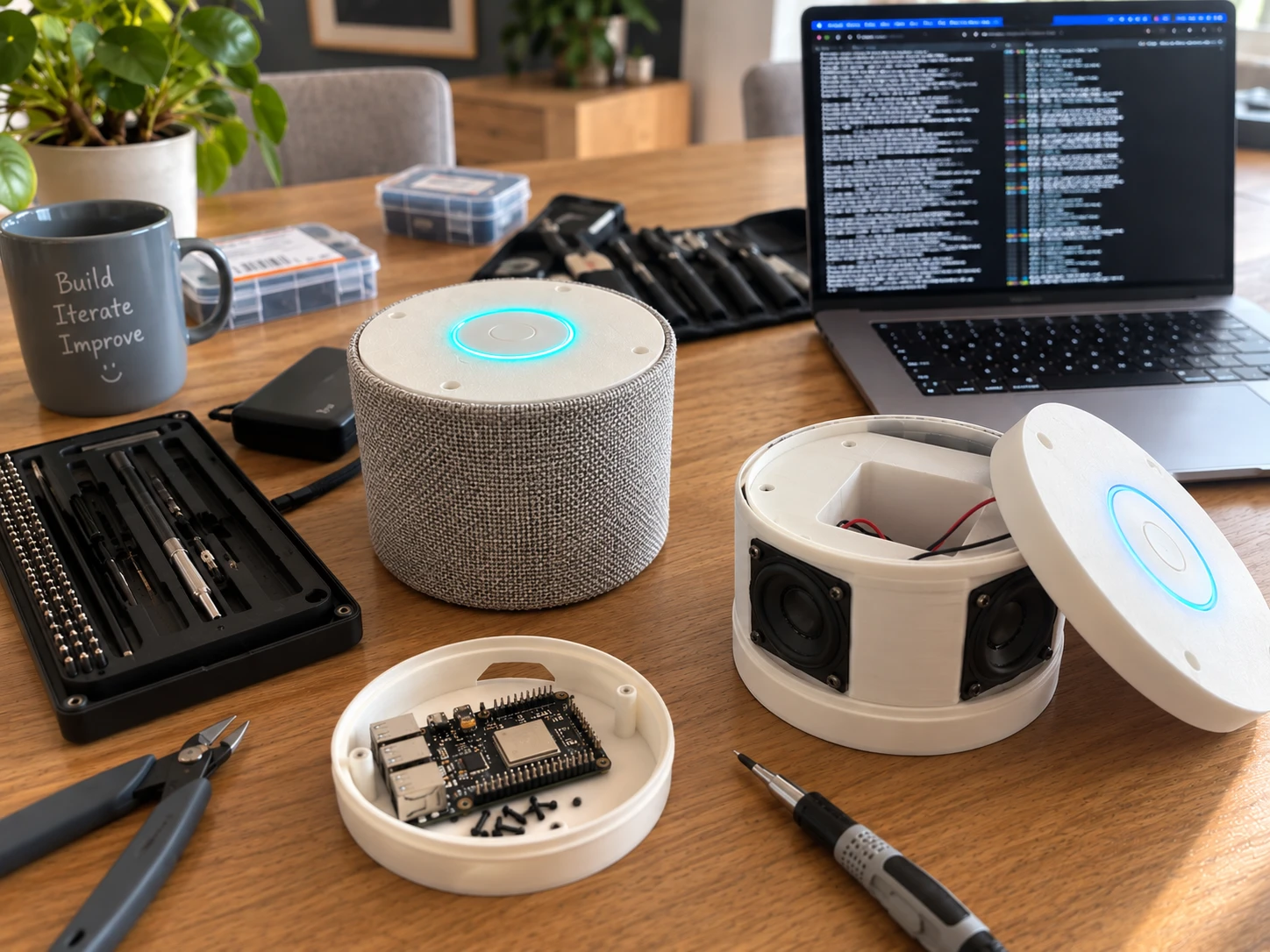
What started as a simple idea — helping older adults stay independent for longer — is taking more and more shape. These are our first real Babbls.

They’re not finished yet. And that’s exactly the point. Because only when you can put Babbl on the table, talk to it and use it every day do you discover what really works well.

Two Babbl prototypes on a wooden workbench: a round Babbl with a grey fabric cover and a glowing ring on top, and an opened Babbl with visible speakers and wiring. In front lies the separate circuit board, with tools and a laptop around it.
A look at our workbench — the first Babbl prototypes, September 2026. (Photo lightly edited.)

We’re building Babbl step by step

How big should Babbl be? Are the controls pleasant to use? Is it easy to understand? And perhaps most important of all: does it feel natural to simply ask Babbl something?

We don’t want to work that out only from behind a desk. With these first prototypes we can try Babbl out, improve it and, soon, discover together with older adults what needs to be different or better.

That’s how Babbl grows, step by step, from a first prototype into a trusted assistant that can simply have its own spot in the home.

Where we are now

  1. First prototypesDone — they’re on the table.
  2. First version in the worksNow: the Babbl app, easy set-up, having letters explained, your diary, and handling important information safely.
  3. Trying it out in practiceTogether with older adults and families.
  4. Babbl for the homeA device that’s ready for your living room.

Talking where it works. A screen where it helps.

Just talk

No menus or buttons to remember. You ask the way you would ask a person. And quick questions in between are fine too.

Babbl and the app

Babbl itself is for talking to. The app is there for when a screen is handy: for setting up, for photographing a letter or for safely confirming something.

Your email, in plain language

Babbl tells you what has come in: who it’s from, what’s important, and what can’t be trusted. Babbl skips the adverts. Before sending a reply, Babbl reads it out to you first.

Important things kept safe

Information that really matters gets extra protection. That’s why, for some things, Babbl asks you to confirm first.

Scams and fake messages

“Is this normal? Is this really safe?”

An email from “the bank”, a text about a missed parcel, a phone call about your bank card. Scammers are getting smarter all the time. Not sure? Just ask Babbl, before you do anything.

If you link your email to Babbl, Babbl keeps an eye out too: messages that can’t be trusted are flagged separately — and Babbl never acts on them.

  • “Someone from the bank is asking for my PIN. Is that allowed?”
  • “I have to pay for a parcel. Is that real?”
  • “Should I click the link in this email?”
  • “I’ve got a bill I don’t recognise. Do I have to pay it?”
  • “Is this email from DigiD genuine?”
  • “Someone from the bank called. Should I hand over my card?”

For a phone call or text, you tell Babbl what happened. A letter you don’t trust, you photograph with the app.

“Babbl, is there any post?”

“You have three new emails. One from your grandson Daan, one from the council about your waste collection pass, and one I don’t trust: it looks like it’s from your bank, but it isn’t. I’ll leave the adverts.”

“The one from the bank… what do I need to do with my bank card?”

“Nothing. This email is very probably fake. Your bank will never ask for your card or your PIN. I won’t open the link and I’ll leave the message alone. Would you like to phone the bank yourself? The number is on the back of your card.”

“Could you ask Anne to have a look with me?”

“I’ll ask Anne.”

Yourself, or together — you choose.

And built in, so a scammer can’t get in through Babbl

New people only at your home

Adding someone to your circle happens at Babbl, in your home, out loud. A scammer on the phone can’t arrange that remotely.

No new numbers through a conversation

Babbl only sends things to people and addresses you already know. Just saying something won’t add a new number or address.

Your keys stay at home

Your passwords and keys never leave the device.

Babbl thinks things through with you, but it can get things wrong. Still unsure? Call the organisation yourself, on a number you already know.

What we’re working towards

Designed to belong at home.

Babbl is full of technology, but it doesn’t need to look like it. We’re building the final device on what we learn from our prototypes: easy to use, pleasant to talk to and designed to simply find its place in the home.

  • The same round shape as the prototype — a little lower, so it sits quietly on a table or shelf.
  • A larger button with a light ring, flush with the top.
  • A soft fabric cover, in colours that suit your home. Ideally interchangeable.
  • No screen. Babbl is for talking to.
Four Babbls on a coffee table in a bright living room: round and low, with fabric covers in sage green, terracotta, ivory and blue, and a glowing ring around the button on top.
Design direction (render), not a final product. Shape and colours may still change.
A daughter comes to visit and hugs her mother in the doorway
Your trusted circle

People close by, if you’d like.

Babbl is there for you first and foremost. But sometimes it’s nice to bring someone in. You can invite people you trust into your circle — your daughter, a neighbour, a friend.

  • Helping think about an appointment
  • Keeping a shopping list together
  • Responding when you ask for help
  • Looking at a letter or message that you choose to share with them

You decide who belongs and what they can see. Babbl doesn’t keep watch on anyone.

Coming soon

You tell Babbl what you want to sort out. Babbl helps you find the right way.

More and more goes through apps, websites and login codes. You don’t need to know which organisation or system is behind it. Babbl can become the bridge: to family and neighbours, but also to the world around you.

“I need to go to the dentist on Tuesday, but I’ve got no transport.”

  • AnneYour daughter, if she can
  • A neighbourhood volunteerThrough a community care organisation
  • The village carA local transport service

Think of: local transport · community and social activities · the council · care providers · your diary · shopping and delivery

Your interests first. Babbl advises in your interest. If services from companies are ever added, that will always be clear — and nobody pays to be recommended by Babbl.

Privacy & trust

Your information, your control.

You stay in control

Babbl only shares something with others if you want it to.

Clear agreements

People in your circle only see what you give permission for.

Extra protection

Sensitive information gets an extra layer of security.

Our own servers in the EU

Your speech is processed on infrastructure we manage ourselves, in the EU. Your keys never leave the device.

Read how we handle your information

The next step

Discovering together what really works.

The next step is the most important one: using Babbl with the people we’re making it for. In the coming period we’re looking for people and organisations who would like to take part.

Older adults and families

Would you like to try Babbl and tell us what you think? Sign up; we’ll be in touch as soon as there’s a place.

Sign up ↓

Organisations

Do you work with older adults, in community care, a neighbourhood initiative or around independent living? Help us think about testing in practice.

Sign up your organisation →

Partners

Do you offer a service that ought to be easier to reach? Let’s look at how that could work through Babbl.

Get in touch as a partner →

Keep me posted

For older adults, families and anyone who’d like to follow along. You’ll hear from us as soon as there’s a place to take part.

Contacting us on behalf of an organisation? Use the sign-up form for organisations.

No spam. You can unsubscribe at any time.

✓

Thank you!

We’ll keep you posted and be in touch as soon as there’s a place to take part.

How Babbl began

It started with something we saw around us.

People who manage their lives perfectly well on their own, but more and more often get stuck on a letter, an app or a login code. Not because they can’t do it, but because more and more goes through screens and systems.

After many conversations — with older adults, families and people working in care and community services — and a lot of trying things out, the first prototypes are now on the table and the software is being built.

Babbl is still young. The next steps: finishing the first version, testing it in practice, working with organisations and building a team around Babbl. Would you like to talk about that? I’d love to hear from you.

Eric Hendriks, founder · Get in touch

Would you like to share ideas, take part or find out more?

Whether you’d like to use Babbl yourself, know someone it might suit, or want to work with us as an organisation: we’d love to hear from you.

Frequently asked questions

Not yet. The first prototypes exist and the first version is being built now. Testing in practice comes after that. Would you like to stay informed? Leave your details.

For anyone who wants to keep handling everyday things themselves for as long as possible. People around you can join in if you’d like.

No. Babbl doesn’t keep watch on anyone. People in your circle only see what you share with them, and you decide who is in your circle.

Unsure about a phone call, text, email or letter? Ask Babbl before you do anything; Babbl thinks it through with you and tells you honestly what it makes of it. If you’ve linked your email, Babbl flags suspicious messages separately and never acts on them. On top of that, nobody can simply add a new number or get into your circle through a conversation with Babbl. Babbl can get things wrong: if in doubt, call the organisation yourself, on a number you already know. More about this.

No. You simply talk to Babbl. For setting up and for some secure actions you use the Babbl app; someone you trust can help you with that too.

Your speech is processed on servers we manage ourselves, in the EU. Babbl shares nothing with others unless you want it to, and what Babbl remembers about you is encrypted with a key that exists only in your device. Read more about privacy.

Pricing details will follow later. Our aim is to make Babbl accessible to everyone who would benefit from it.